.Connect
This section specifies the configuration of Adaptricity.Connect. 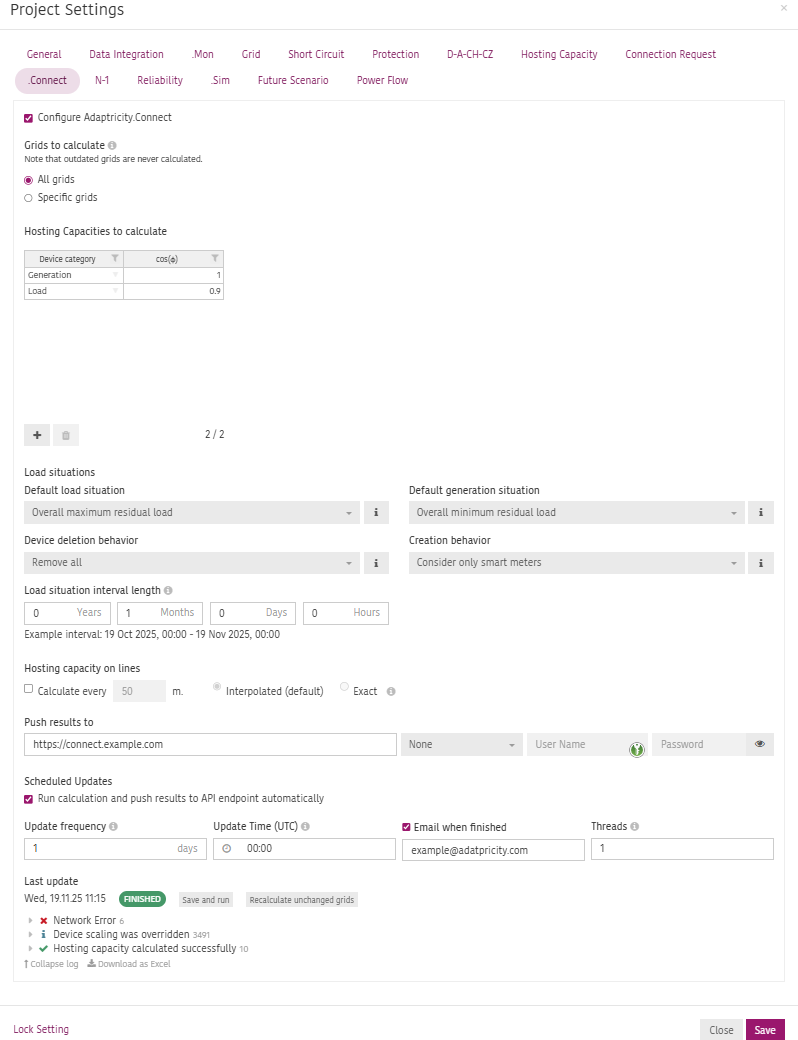
Grids to calculate
Specify which grids should be included in the hosting capacity calculation.
- All grids: all consistent and up-to-date grids will be included in the calculations.
- Specific grids: select only specific grids to be included in the calculations.
INFO
Outdated or Inconsistent grids will never be included.Hosting Capacities to calculate
Specify the device category and power factor (
Load situations
Specify the load and generation situation based on which the hosting capacity in the grids should be calculated.
INFO
More information about load situations can be found in Load Situations
Default load/generation situation
- Use loads and generators from grid: The static loads and generators defined in the grid model are used.
- Overall maximum/minimum residual load: The load situation matches the point in time when the grid assumes the overall maximum/minimum residual load within the selected time interval. The slack bus reference voltage matches the point in time when the grid assumes the maximum/minimum residual load.
- Per-bus maximum/minimum residual load: The load situation maximizes/minimizes the per-bus residual load within the selected time interval. The slack bus reference voltage is set to the minimum/maximum of the voltage measurements within the selected time interval.
Device deletion behavior
A load situation replaces the static load and generation in the grid, this setting defines if all or only a part of the existing loads and generators are replaced.
- Remove all: All loads and generators of the grid are deleted, even if they are not considered in the load situation (e.g. because they don't have a time series behavior). Choose this option if the data from the load situation shall replace all existing static load and generation.
- Remove considered devices only: Only devices that were considered in the creation of the load situation (e.g. because they have a time series behavior) are actually removed by the load sitation. Other devices / connection requests that were not considered in the load situation are not deleted.
Creation behavior
Specify what resources should be used to create the load/generation situation
- Consider only smart meters: only data from smart meters are considered when creating the load/generation situations.
- Use configured time series behavior(s): Use the time-series-behavior configuration of each device (e.g. standard/reference profile, metered, etc.) if provided or the fallback behavior for that corresponding type of device defined in the .Sim settings in the unmetered tab.
Load situation interval length
Specify how far back in time the smart meter measurements should be considered to create the load situation.
Hosting Capacity on lines
Click the check box if the hosting capacity should be calculated on lines and cables. The standard behavior is that the hosting capacity is only calculated on buses in the grid.
Specify the interval in meters to create virtual connection points on lines and cables between existing buses.
The following two options are available to calculate the hosting capacity of the line:
- Interpolated: Assigns the minimum hosting capacity of the adjacent buses as the hosting capacity of the line.
- Exact: Adds additional virtual buses on the line in the specified interval and calculates the hosting capacity on each of the virtual buses.
Push results to
Specify the API endpoint where the hosting capacity results should be sent to and what authorization method should be used.
Scheduled Updates
Specify if the update frequency and time when the hosting capacity calculation should automatically run an push the results to the specified API endpoint. Optionally define an Email address to receive a report when the calculation has finished.
Last update
Check the time of the last update and logs related to the calculation.
Click to save the configuration and re-run the calculation. If the configuration hasn't changed and the grids remain unchanged, nothing will be done. If unchanged grid should be re-calculated, click .