Phase Balancing
In a low voltage grid many households, heat pumps, EV chargers, and PV installations are connected to only one of the three phases. When too many of them are connected to the same phase, the three phase voltages become unequal. This is called voltage unbalance. It impacts motors and transformers, reduces power quality, and is limited by standards such as EN 50160.
Phase Balancing answers one question: which few loads and generators should be reconnected to a different phase so that the unbalance drops, and what is the smallest number of reconnections that gets you there? The result is an ordered list of moves, for example "Load 50: A to C", which you can turn into a Grid Upgrade with one click.
Phase Balancing is part of the .Unbalance add-on and only works on grids modeled with phases.
How It Works
Measuring Unbalance
Unbalance is measured by the Voltage Unbalance Factor (VUF), in percent. It compares the part of the voltage caused by the unbalance with the normal, balanced part. 0% means the three phases are perfectly balanced. The VUF is calculated at every bus that has all three phases, except the slack bus, whose voltage is fixed.
The VUF limit you set in the Settings is the unbalance you accept. Only unbalance above the limit counts against the grid, and large exceedances count much more than small ones. A few badly unbalanced buses are therefore fixed before many slightly unbalanced ones.
Typical Moments in Time
Unbalance changes during the day, so the calculation can look at a whole time range instead of a single snapshot. Checking every possible move at every timestep would take hours. Therefore, timesteps that look alike are grouped, and one actual, typical timestep is kept for each group. Each typical timestep counts in proportion to how much of the time range its group covers.
Choosing the Moves
The calculation moves one device per round:
- List the options. Every single-phase load or generator can move to any other phase that exists at its bus. Three-phase devices are never moved.
- Shortlist quickly. A fast estimate predicts how much each option would reduce the unbalance, without running a full power flow for each one.
- Check the best ones exactly. The most promising options are verified with a full power flow at every typical timestep. Options for which the power flow does not converge are discarded.
- Keep the best move. The move that reduces the unbalance most is kept, and the next round starts from the updated grid.
If none of the shortlisted options helps, every remaining option is checked exactly before the calculation gives up. The calculation stops when the maximum number of devices has been moved, when no unbalance above the limit is left, or when no further move improves the grid.
Because each move is the best one available at its step, the first moves in the list always bring the biggest improvement. Taking the first N moves gives you the best set of N moves the calculation found.
INFO
A device moves as a whole: its active and reactive power stay the same and only the phase changes. The grid topology, tap positions and all other devices stay fixed. Moving one device at a time is a practical approach and is not guaranteed to find the absolute best combination of moves.
Grid
Phase Balancing runs on one grid at a time. Choose the grid from the Grid dropdown list and click to start the calculation. The calculation runs in the background and shows its progress. Click Cancel to stop it; the moves found so far are kept.

If the same grid has already been calculated with the same add-ons and settings, the stored result is shown instead of calculating again. Earlier results can be selected from the dropdown at the top of the page.
Grid Upgrades, Connection Request and Scenarios
Grid Upgrades and Connection Requests are applied to the grid by default depending on their status. They are part of the grid model for the duration of the calculation.
To change the default selection, select or deselect the desired add-ons from the list. Reloading the page or clicking on the refresh button will restore the default selection.
Scenarios and Load Situations are never applied by default. They need to be specifically selected.
Settings
Click on at the top of the page to open the Calculation options. Click in the dialog to start the calculation with these options.
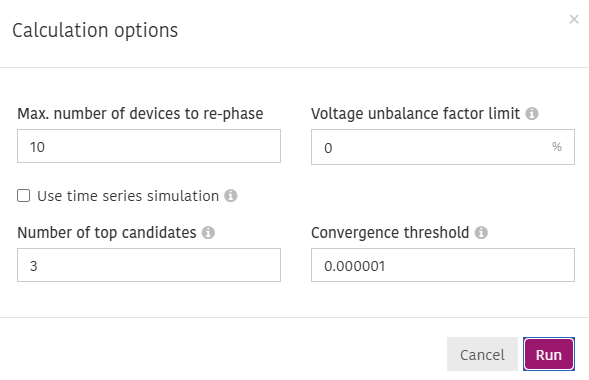
- Max. number of devices to re-phase: The maximum number of devices the calculation may move. A higher number gives you a longer list of moves to choose from, but takes longer to calculate. You can still decide later how many of the moves to apply. Default is 10.
- Voltage unbalance factor limit: The voltage unbalance factor limit that phase balancing tries to bring every bus below, in percent. Unbalance below the limit is accepted, so the calculation stops once every bus is within it. With the default of 0%, any unbalance counts, and the calculation keeps moving devices until it reaches the maximum number of devices or no move helps any more. EN 50160, for example, limits the voltage unbalance to 2%.
- Use time series simulation: Use time series to balance the phases, so the moves work across the day or across seasons rather than at one moment. If turned off, the grid's static load and generator powers are used. Time series are more representative but slower. The time range is limited to the period covered by the grid's monitoring data, if there is any. If you use Adaptricity.Mon, you have the option to use .Mon simulation results and skip the baseline voltage unbalance factor calculation to speed up the calculation. Note, however, that grid topology changes made after the .Mon calculation are not reflected in its results, so the Phase Balancing algorithm might make wrong decisions due to outdated data.
- Number of top candidates: The number of loads or generators for which the voltage unbalance factor is calculated exactly before the best one is selected. A higher number increases calculation time, but yields more accurate results. Default is 3.
- Convergence threshold: The minimum improvement in each calculation step. The calculation stops when no move improves the unbalance by more than this value. Default is 0.000001.
Results
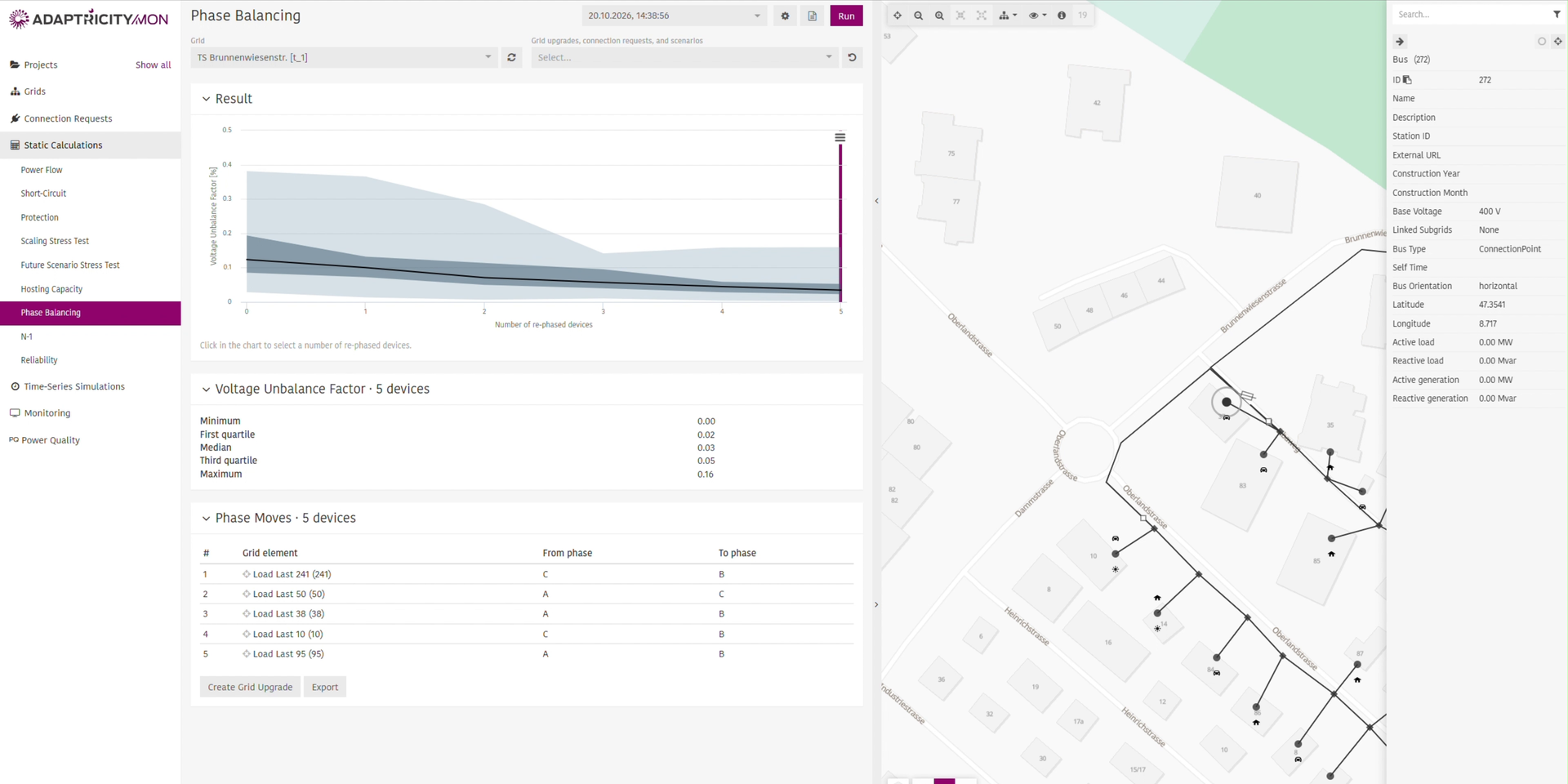
Result Chart
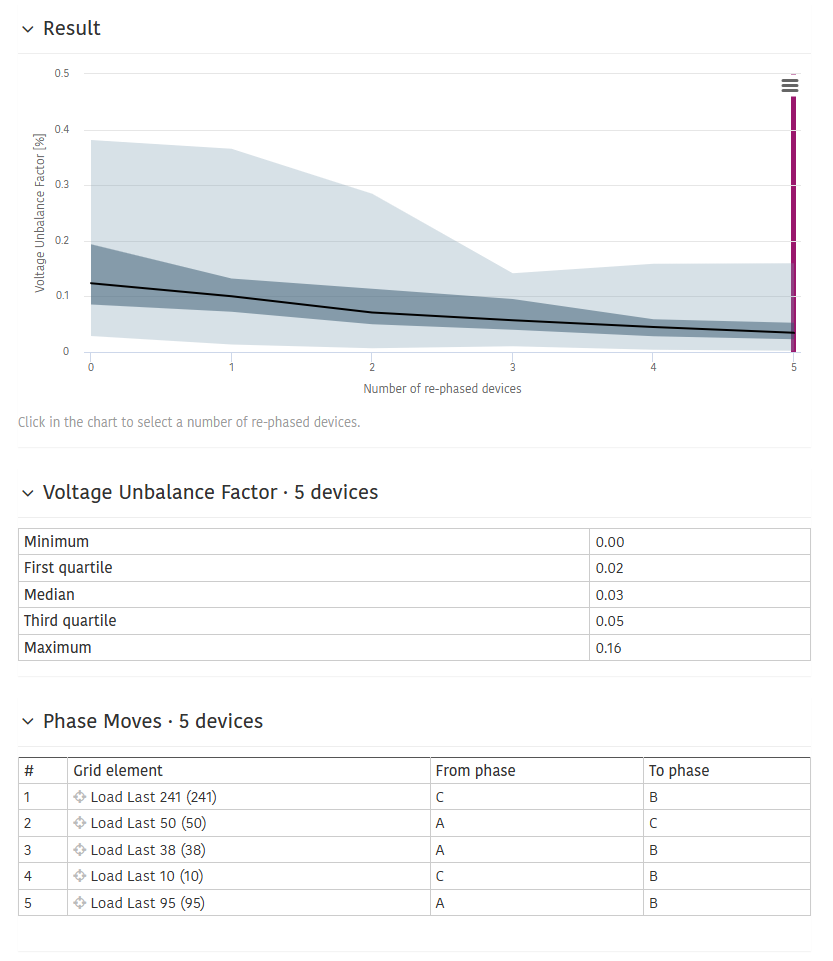
The chart shows how the Voltage Unbalance Factor changes with the number of moved devices. Position 0 is the grid as it is today.
- The black line is the median VUF across all buses and timesteps.
- The dark band shows the middle half of the values, from the first to the third quartile.
- The light band shows the full range, from the minimum to the maximum.
Hover over a position to see the exact values. Click in the chart to select how many devices you want to move. The selected position is marked with a vertical line, and the tables below update to match.
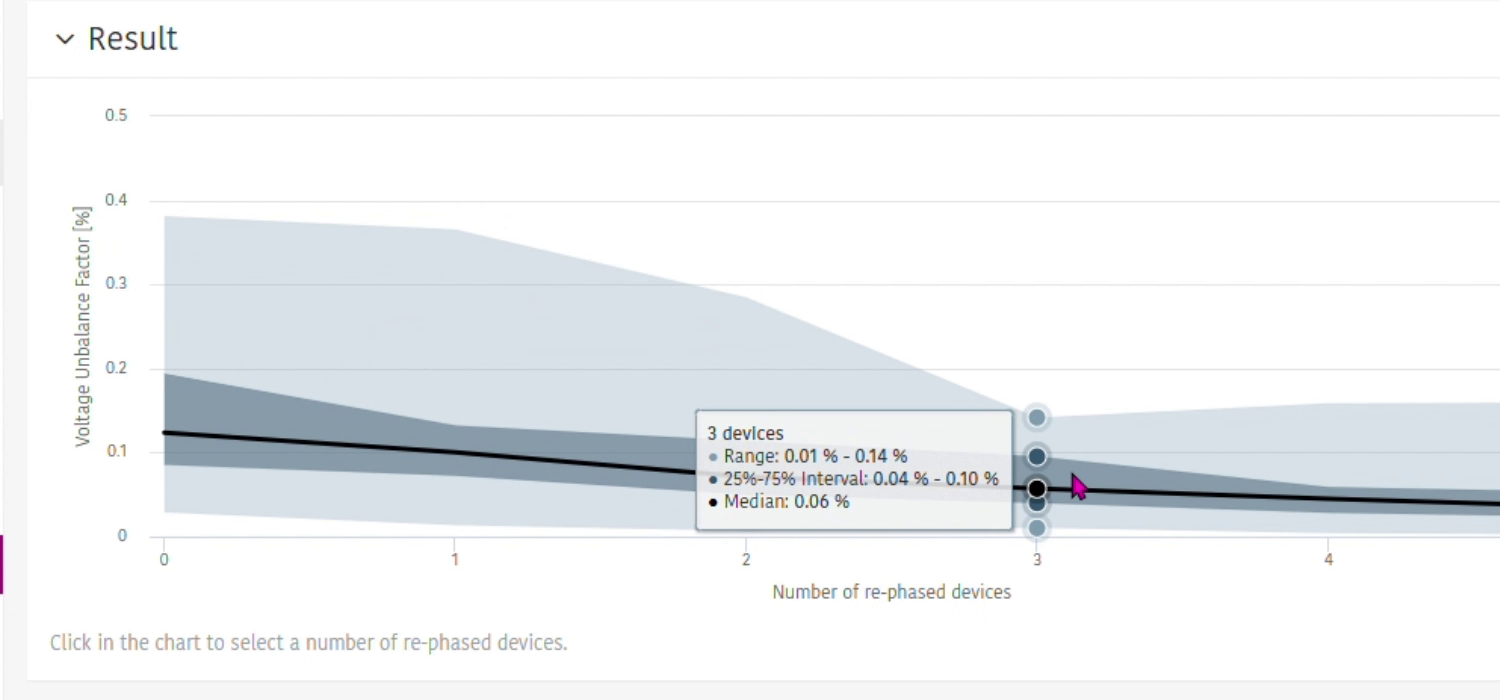
Voltage Unbalance Factor
Shows the minimum, first quartile, median, third quartile and maximum VUF in percent after the selected number of moves.
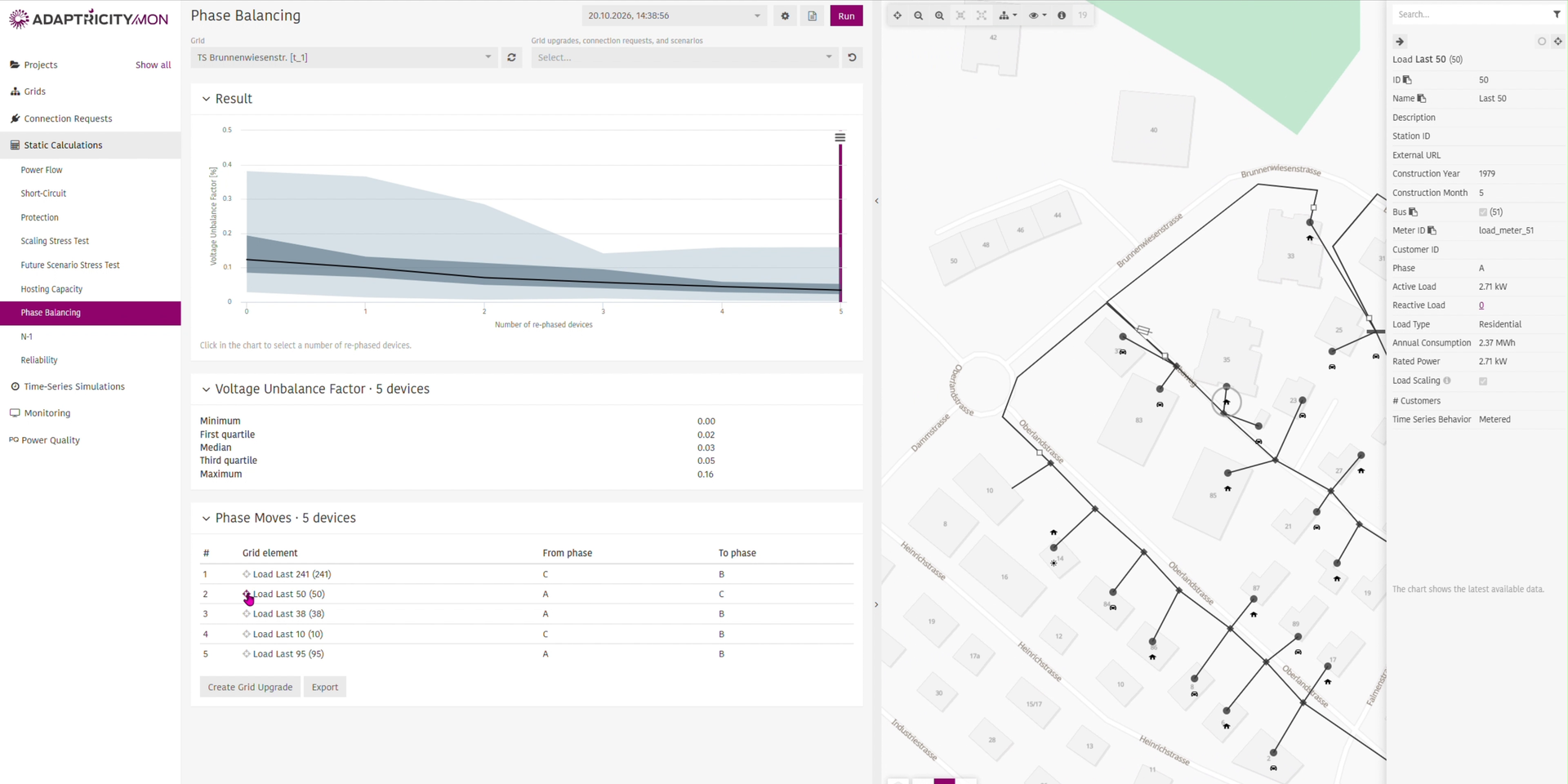
Phase Moves
Lists the moves for the selected number of devices, in the order the calculation found them. Each row shows the grid element, the phase it is connected to today and the phase it should move to. Clicking on next to a grid element highlights it on the map and opens it in the inspector.
Click to download the moves as an Excel file, for example to plan the reconnections in the field.
PDF Report
Click at the top of the page to generate a PDF report of the result.
Creating a Grid Upgrade
Click to turn the selected moves into a Grid Upgrade. The grid upgrade is named after the number of moved devices, for example "Phase Balancing (5 Devices)", contains each move as a modification and starts with the status Pending. The grid itself does not change until you apply the grid upgrade.
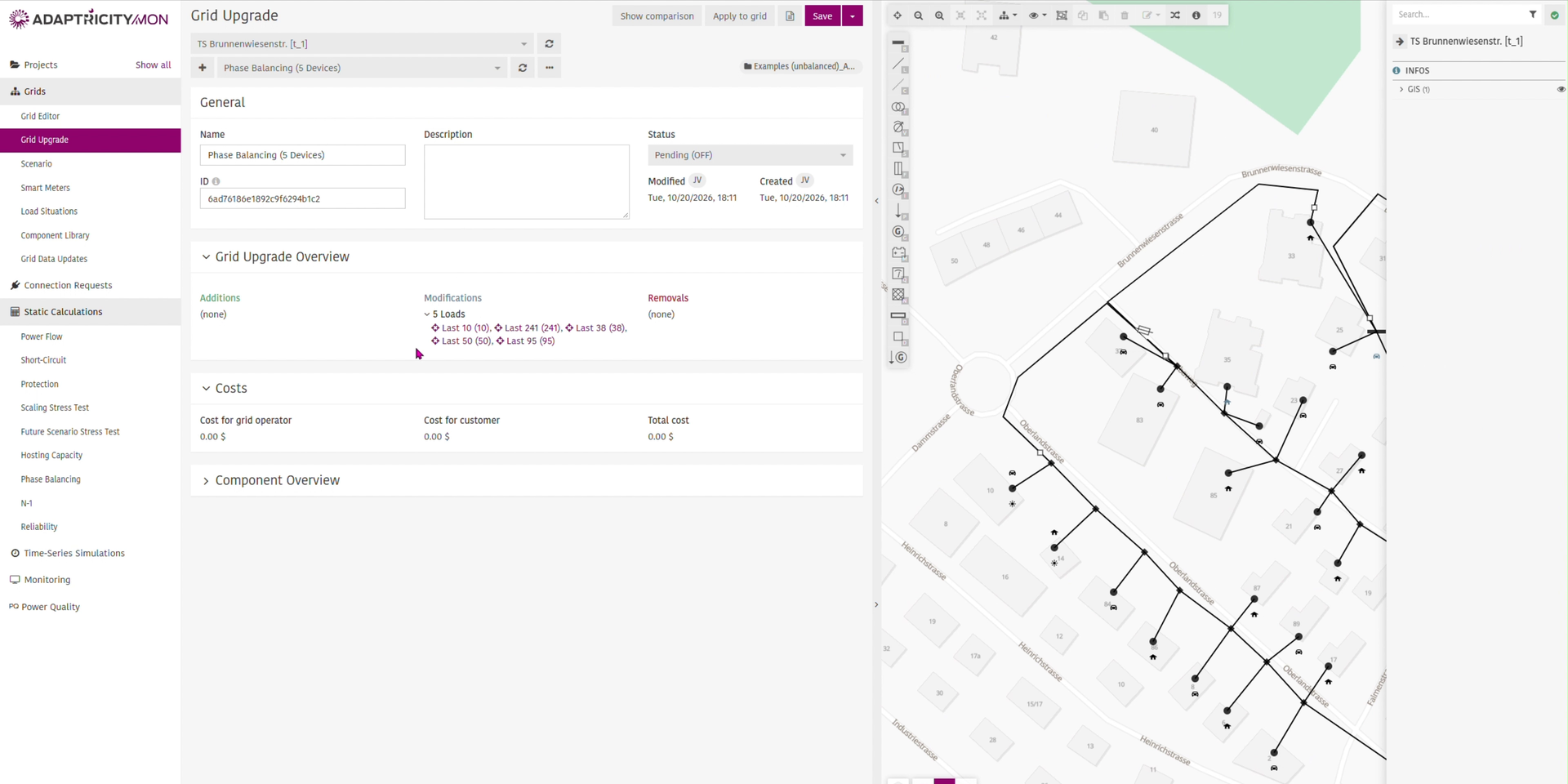
Select the grid upgrade in other calculations, such as Power Flow or Time Series Simulations, to check the effect of the moves before you carry them out.
WARNING
A result belongs to the grid as it was when the result was calculated. If the grid has been edited since, run the calculation again before creating a grid upgrade.
Limitations
- Only single-phase loads and generators are moved. Transformers, lines and three-phase devices are never changed.
- A device can only move to a phase that exists at its bus. The calculation cannot add a phase conductor.
- The calculation does not run on symmetric grids.