Version 26.5
Released on 20.10.2026
Power Quality (.PQ)
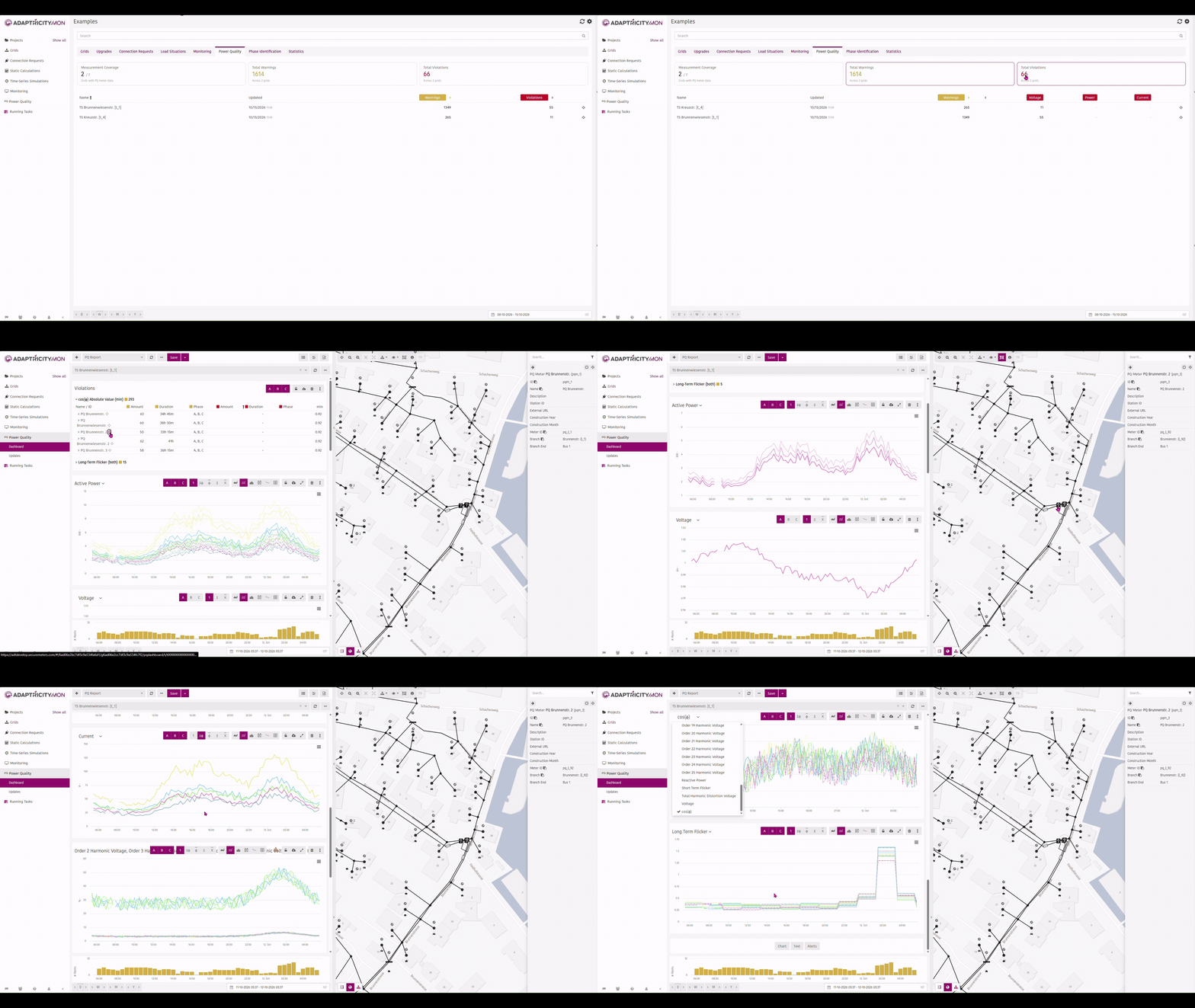
.PQ has been rebuilt from the ground up on the new grid model, where power quality measurements belong to PQ meters placed in the grid. It now uses the same dashboard as .Mon, so you can select PQ meters in the grid inspector and view their measurements alongside the rest of the grid. A new PQ tab on the Project Overview page shows power quality across the project. See Power Quality for details.
 |
|---|
| The rebuilt .PQ dashboard and the PQ tab on the Project Overview page |
Connection Requests per Phase
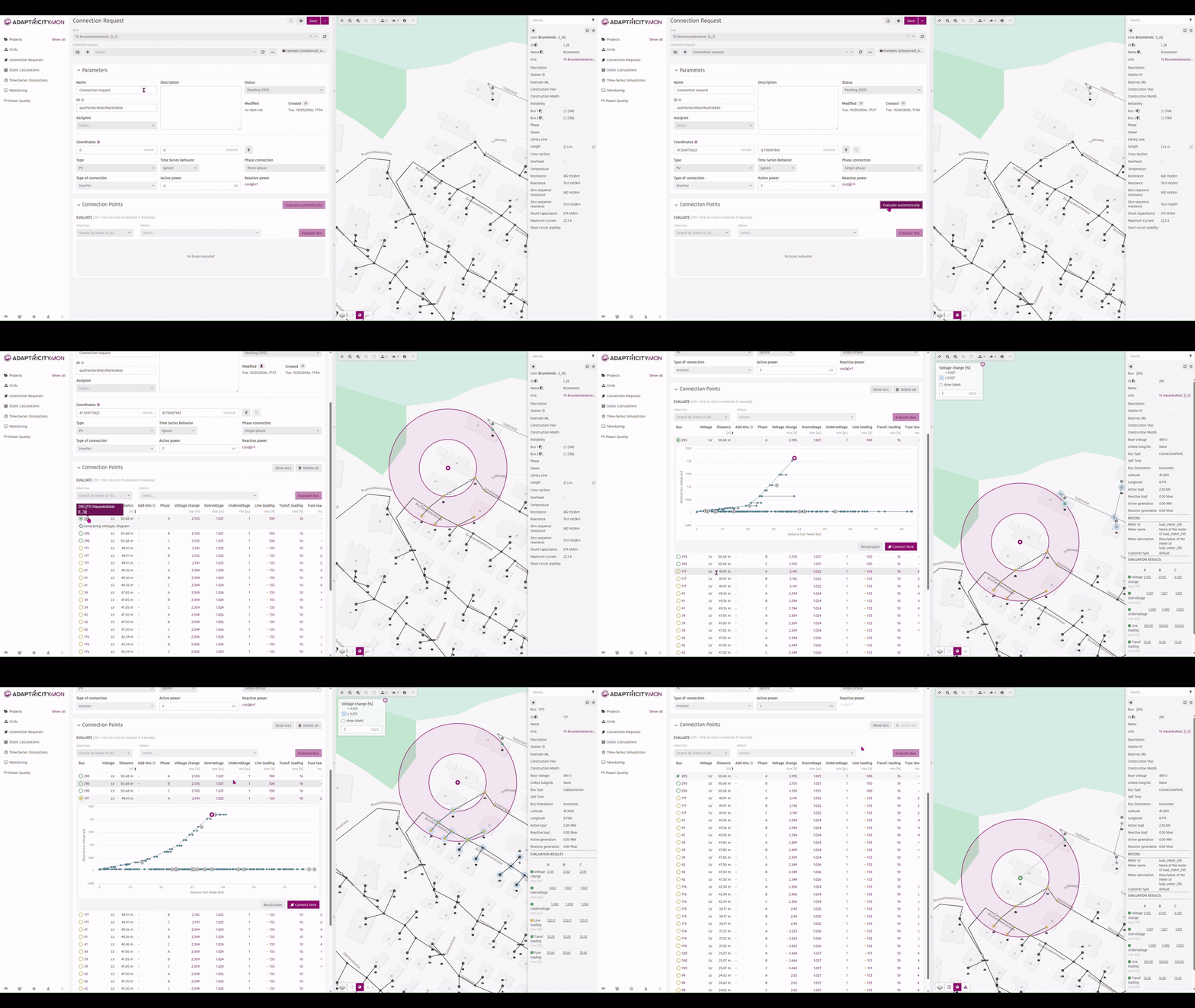
In unbalanced grids the impact of a connection depends on which phase the customer is connected to. You can now set the phase connection of a custom connection request to single, two or three phase in the device parameters. The summary table then shows one row per phase combination for each candidate bus (A, B and C; AB, AC and BC; or ABC), each with its own voltage change, voltage and loading results, so you can compare the options directly. The feeder chart shows one voltage curve per phase, and the report carries the same per-phase breakdown. When you connect the request, the selected phase is stored with it.
 |
|---|
| Per-phase rows in the connection request summary table |
Phase Balancing
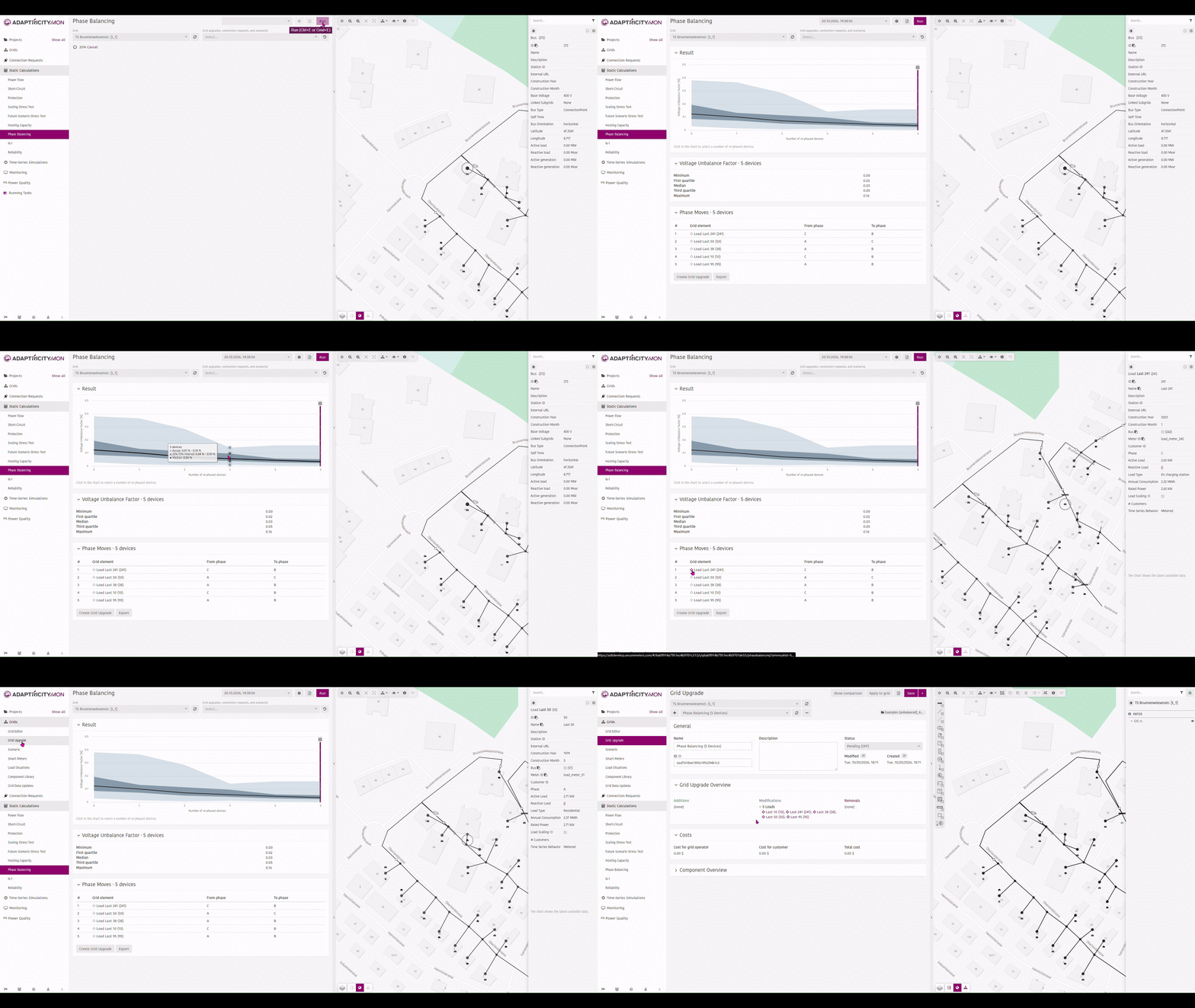
Single-phase EV chargers, rooftop PV and uneven residential loads push low voltage grids out of balance. The new Phase Balancing page recommends which loads and generators to move to which phase to reduce the voltage unbalance, ordered so that the first moves bring the biggest improvement. You choose how many moves to take, export them as an Excel (.xlsx) file and turn them into a grid upgrade with one click. Phase Balancing is part of the .Unbalance add-on. See Phase Balancing for how it works.
 |
|---|
| Recommended phase moves and the resulting grid upgrade |
Public API
A new public API gives programmatic access to projects, grids, hosting capacity and short circuit calculations. You can also run power flows with generic parameters and query results by address or by geographic area. Access uses dedicated API users, which administrators create in the Admin Panel.
BOE-Compliant Hosting Capacity Report for Spain
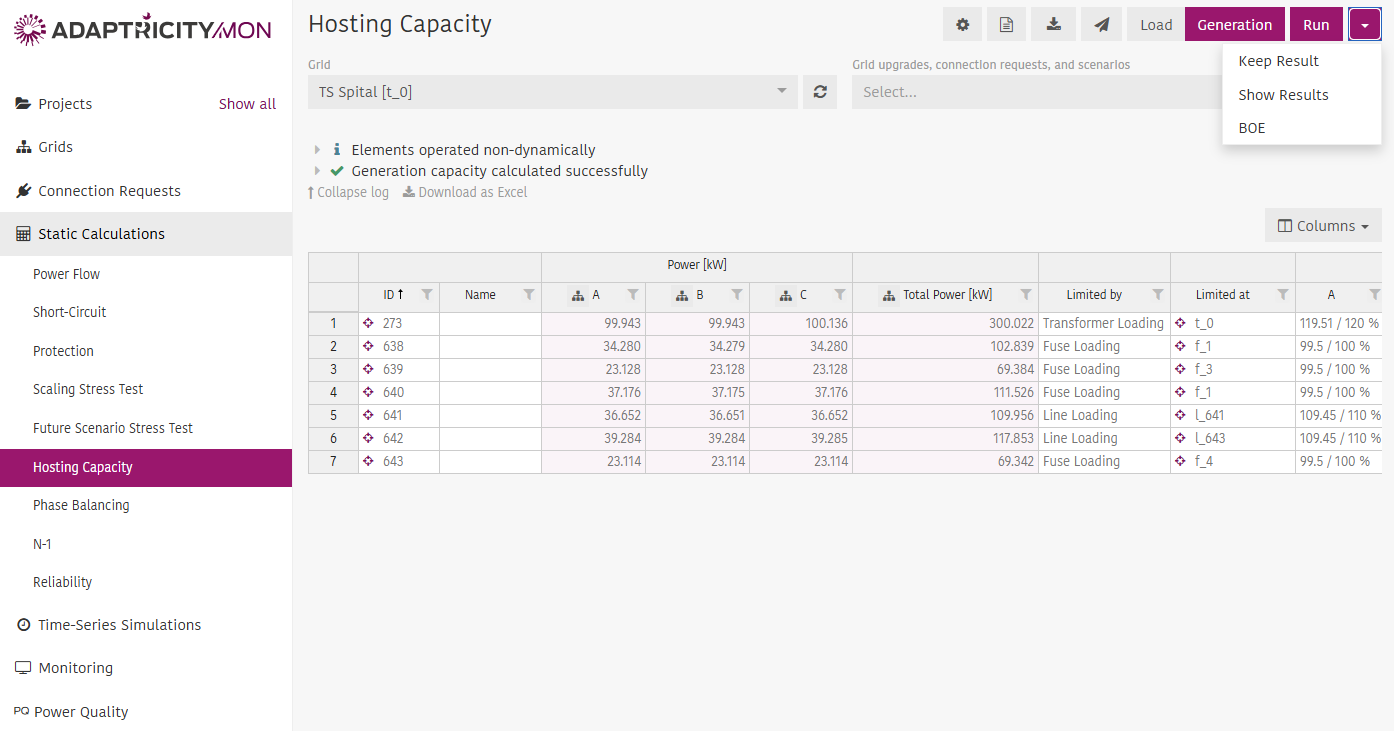
For the Spanish ruleset, you can now export hosting capacity results as an Excel report in the format required by the BOE. Results are grouped by station, voltage level, violation type and element, the lowest hosting capacity of each group is reported, and coordinates are converted to UTM ETRS89. The export is available from the new BOE option in the dropdown next to Run on the Hosting Capacity page.
 |
|---|
| The BOE option in the dropdown next to Run on the Hosting Capacity page |
Customer Logo on Reports
Reports can now show your own logo next to the Adaptricity logo. Upload, replace or remove a logo per project in Project Settings, General. Administrators can set a default logo in the Admin Panel under Miscellaneous, which is used for projects without their own. Your logo appears on the left of the report and the Adaptricity logo on the right.
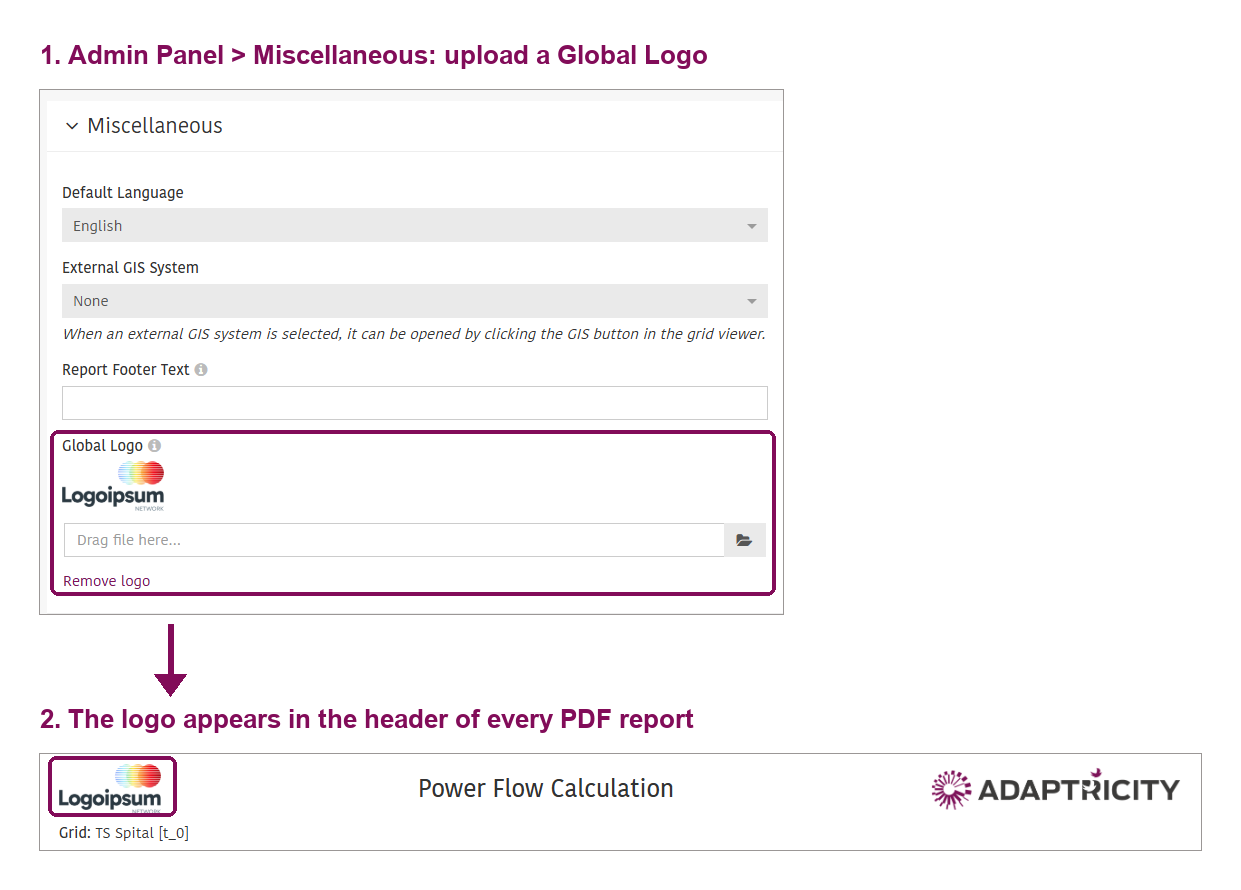 |
|---|
| Global logo set in the Admin Panel and shown in the PDF report header |
N-1 Evaluation for Connection Requests
You can now evaluate a connection request against N-1 cases. Select the N-1 cases in the Connection Request inspector and the evaluation runs in the background, so you can cancel it at any time.
Improvements
- Neutral Current Plot: You can now plot the neutral current (In) in .Mon and .Sim, alongside the existing line plots.
- New Q(U) Characteristic Type: A new Q(U) characteristic type avoids the convergence problems of the existing one. You define the maximum cos(phi) and the voltage range, and reactive power is adjusted until the voltage is within a fixed deadband.
- Spanish Load Reference Profiles: Spanish load reference profiles are now available. A new "Update profiles" button on the Reference Profiles tab downloads the latest profiles without starting a simulation.
- Hosting Capacity Limited by the Overlaying Grid: The network feeder parameters used to limit the hosting capacity to that of the overlaying grid are now calculated in the background after data integration, based on a load situation template that you select in the project settings. Adaptricity creates, refreshes or removes the matching load situation for each grid automatically.
- Load and Generation Totals in Load Situations: The Load Situation info message now shows the total load and total generation at the identified timestamp, not only when it occurred.
- More Visible Evaluate Control in Connection Requests: The add-on selector and Evaluate button for a single bus have moved from the inspector to the Connection Points panel, below "Evaluate automatically".
- Violation Count for Filtered Lines on the N-1 Page: The violation count above the N-1 results table now reflects only the lines that match your filter.
- Total Active Power Chart Export: You can now download the data behind the Total Active Power chart in .Mon as an Excel (.xlsx) file and open the chart in full screen, as with the other .Mon charts.
- Slack Bus Measurements Without Smart Meter Data: Slack bus measurements are now plotted even for periods without smart meter data, so the chart no longer shows empty ranges.
- Power Flow Direction in the Summary Table: In the power flow summary table, the "Flow" section is now called "Transformers" and shows active power as negative when it flows in the opposite direction, with an info icon explaining the sign.
- Short Circuit Symbols in Results Tables: Short circuit results tables now use the standard symbols, such as I''k3max, matching the sidebar. The full name is still shown as a tooltip.
- Unmatched Station IDs No Longer Flagged as Inconsistent: A node whose station ID does not match any station now shows an info message instead of an inconsistency warning, since it does not affect the calculations.
- Short Circuit Stability for Lines: The short circuit stability of lines is now shown in the Lines tab of the component overview.
Bugfixes
See full list
Grid
- Fixed the grid data update page freezing when opening the subgrid dropdown on large projects, and restored the status icon of added elements.
- Fixed the transformer nominal voltage showing different values depending on the view and not updating in the grid inspector.
- Fixed feeders not being shown in the schematic view on the Grid Overview page.
- Fixed added grid elements not being shown in the "Compare Grid Versions" map view.
- Fixed changes to a component library component not being saved.
- Fixed special characters being lost when importing a component library or customer list.
- Fixed pasting multiple rows into tables.
- Fixed merged line segments not being shown correctly in the schematic view.
- Fixed the time interval warnings on the Load Situations page showing raw timestamps instead of formatted dates.
- Fixed scenarios applied as an add-on having no effect on the load situation calculation.
- Fixed grid data integration failing to run when the forecast options had never been saved.
Connection Request
- Fixed the connection request update API not updating the status of the request.
- Fixed a warning shown when evaluating a virtual bus, and virtual buses are no longer shown on the Project Overview.
Static Calculations
- Fixed "Show Results" in Hosting Capacity returning an internal error, and the platform freezing when opening the Hosting Capacity settings.
- Fixed an edge case with the Spanish ruleset where hosting capacity limited by the overlaying grid was treated as having no violation.
- Fixed hosting capacity sometimes being reported as 1 TW in unbalanced grids.
- Fixed network feeder parametrization not working for unbalanced grids in Hosting Capacity.
- Fixed power flow settings having no effect.
- Fixed power flow results for transformers not distinguishing between the primary and secondary nominal voltage.
- Fixed clicking a bus in the voltage unbalance section of the Grid Stress Test results not centering on it.
- Fixed a running Grid Stress Test calculation not being cancellable.
Simulation
- Fixed the .Mon and .Sim report page becoming unresponsive and improved its layout.
- Fixed the scenario dropdown in the Hierarchical Simulation settings.
Monitoring
- Fixed .Mon updates failing through API v3 when the grid's loads and generators are symmetric.
- Fixed incorrect voltage normalization when voltage is measured on the secondary side of the transformer.
- Fixed API v3 rejecting meter measurements with gaps. Data can now also be sent in chunks.
- Fixed slack bus measurements sent through API v3 not being taken into account.
- Fixed the column charts on the statistics tab showing values in the wrong time interval.
- The selected time range in the .Mon dashboard is now kept when switching between grids.
- Fixed no data being shown in the smart meter load chart in .Sim for previously imported smart meters.
- Fixed the "Maximum number of days to store data" setting having no effect on a full re-import.
- Fixed alerts that could not be turned off.
- The alerts timeline in .Mon now has the same width as the charts, so values line up.
- Fixed PQ meters not being selectable in the grid inspector on the .Mon and .PQ dashboards.
- The sign of the mismatch in the .Mon active power chart is now consistent with the Project Overview: positive means smart meter power exceeds slack bus power.
Admin
- Fixed a security vulnerability.
- Fixed several permission issues in the Admin Panel for team administrators and team editors, and fixed users not being fully logged out.
- Fixed the login page being skipped after logging out.
- Fixed database migrations failing on on-premises installations that connect to the database over TLS.