Smart Meters
The Smart Meters page lists every smart meter time series stored in the project, including meters imported by .Mon and .PQ. Use it to check which meters have data, over which period and where data is missing, or to import meter data manually without a data integration pipeline.
Smart meter data is the basis for Load Situations and for Time Series Simulations.
Smart meters belong to the project, not to a single grid, so the page shows the meters of all grids in the project.
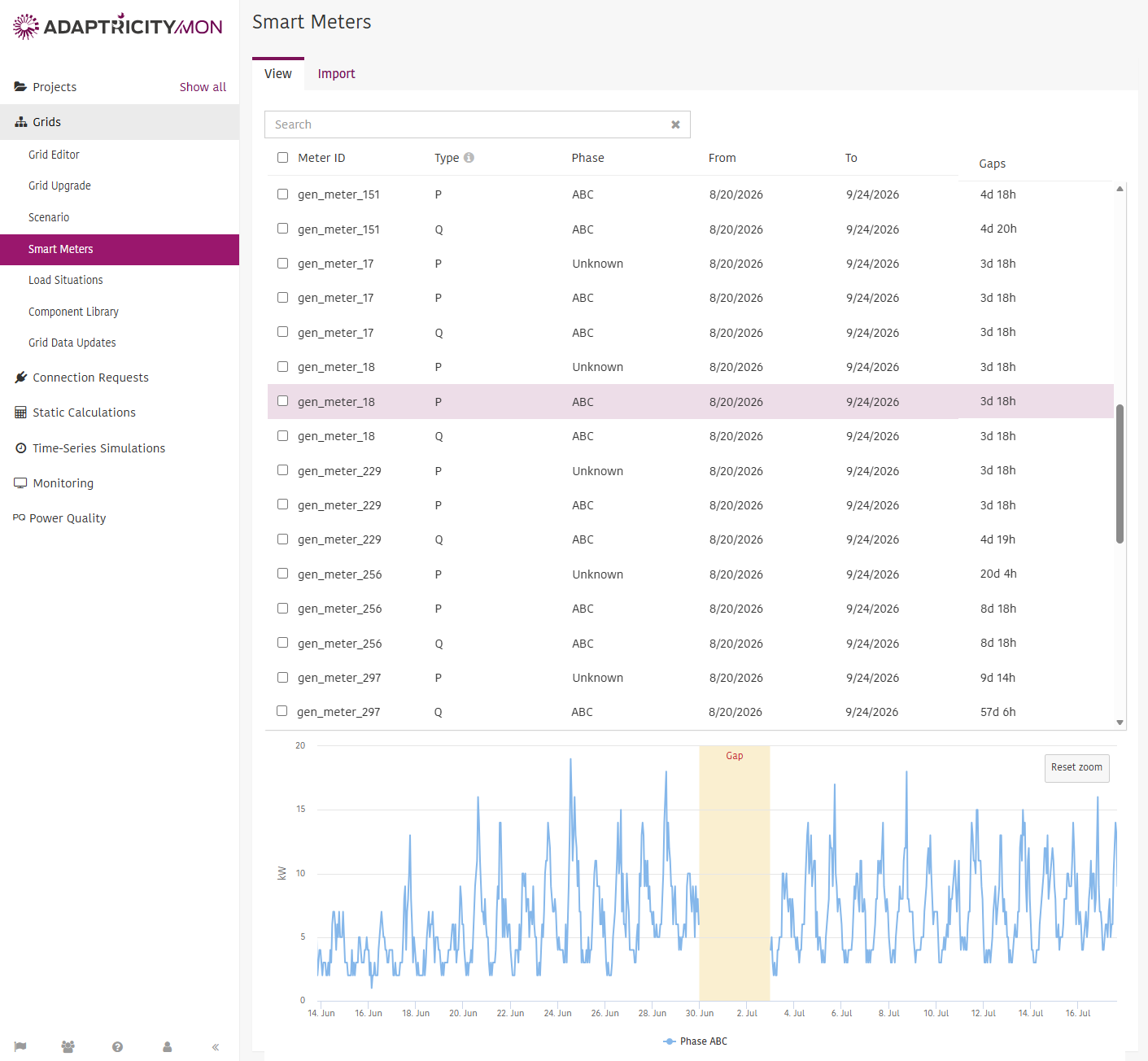
View
Each row is one time series of one meter. A meter that measures both active and reactive power appears once per type.
- Meter ID: the identifier that links the meter to a load in the grid.
- Type: the measured quantity, for example P (active power) or Q (reactive power). Hover over for the full list.
- Phase: the phase the measurement applies to. Unknown means the source data did not specify a phase.
- From and To: the first and last timestamp with data.
- Gaps: the total duration of missing data between From and To.
Use the search field to filter the table by meter ID.
Select one or more meters to plot their data in the chart below the table. Gaps are shaded so you can see exactly where the data is missing, which helps trace the problem back to the source system. Drag across the chart to zoom in and click to return. Meters with different units, for example kW and V, cannot be plotted together.
To delete meter data, select the meters and click .
INFO
Importing and deleting meter data requires at least the Team Editor role.